Restaurant POS for Nepal
Restaurant POS and management software, on the phones your staff already carry
Take orders at the table, send them straight to a live kitchen display, generate the bill and take cash, Fonepay, eSewa, Khalti or khata — from any phone, tablet or laptop with a browser.
Behind the counter, the same system keeps your stock, supplier udhaaro, cash drawer and Bikram Sambat reports. Built for restaurants and cafes in Kathmandu and across Nepal.
Free for your first 6 months. Nothing to install and no new hardware to buy. Prefer to talk? Call +977 9812255299.
One system from the table to the books
Restro Management starts at the order: the waiter's phone, the kitchen display, the bill and the payment are one record, so the numbers that usually go missing are kept without anyone writing them down.
How long each table waited. How much rice actually left the store against what the recipes say. Who owes you, who you owe, and what should be in the drawer tonight.
Everything a restaurant runs on, in one app
Orders & tables
Take the order at the table, on a phone
Tap a table to seat it and start the order. Search the menu, or tap a dish from the frequently-ordered row; pick its add-ons and send a note like “no chilli” or “allergy” to the kitchen with one tap.
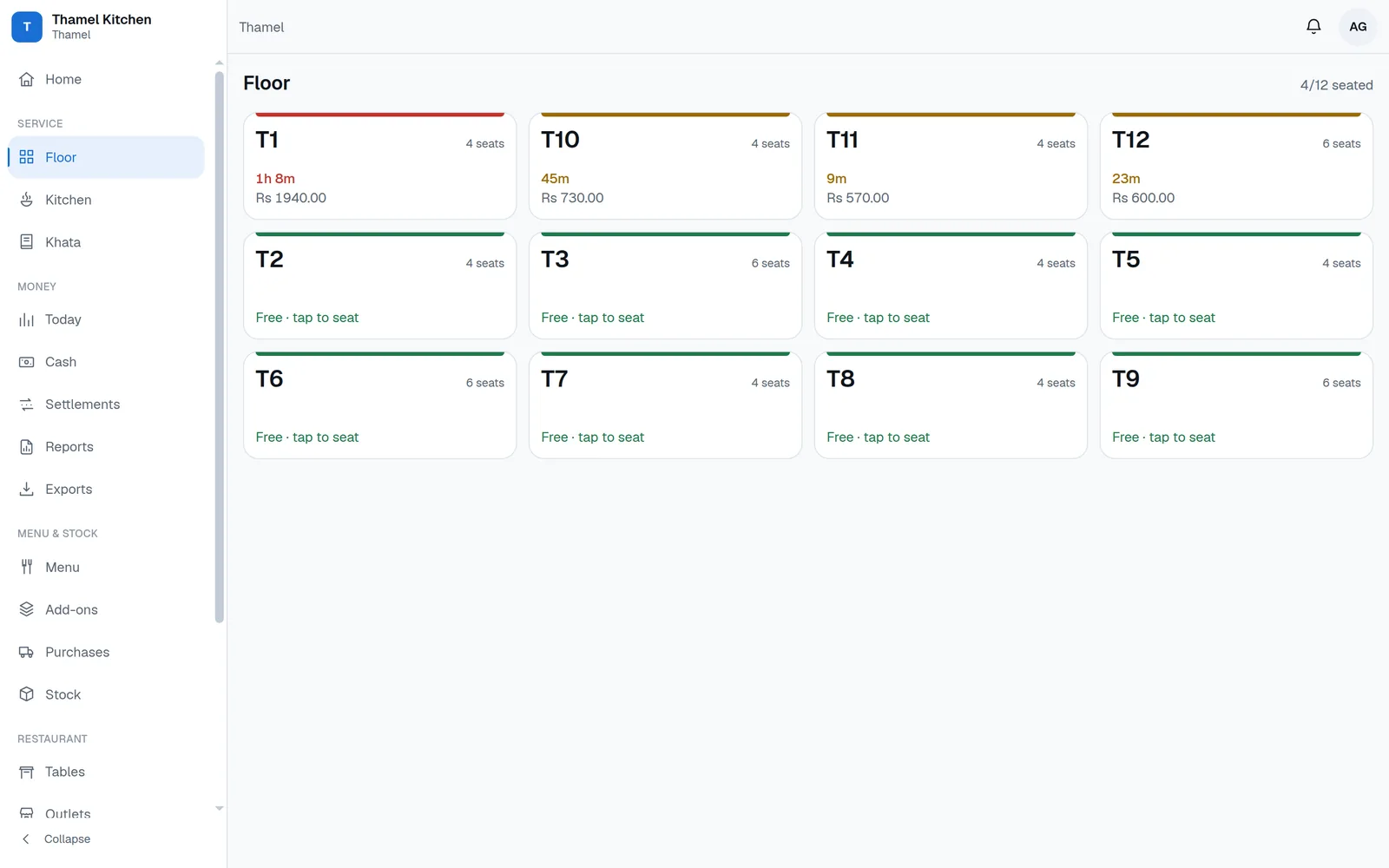
Which table has been waiting forty minutes
The floor map colours every table by how long it has been open, with its running total on it. Service time runs from the first order to the bill, so you see the tables that waited too long, not only the ones that complained.
A QR menu the guest scans at the table
Put a QR sticker on each table and the guest reads your current menu on their own phone — prices with VAT and service charge already inside, veg and non-veg marks, photos. Nothing about what a dish costs you appears on it.
The Wi-Fi question, answered in one tap
Keep the guest Wi-Fi QR code and password in the app, so any waiter can show it from their phone.
Kitchen display (KOT)
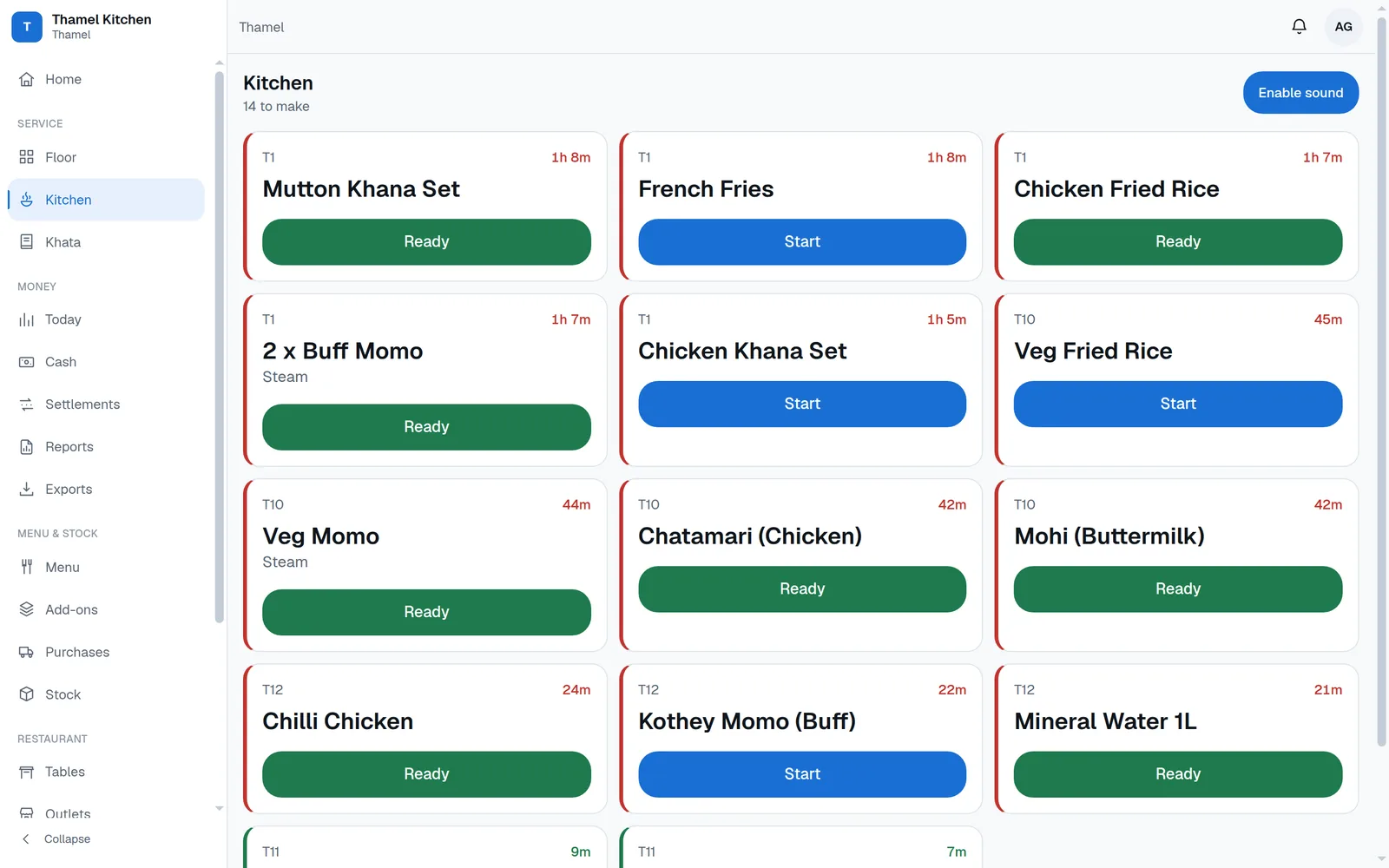
A kitchen screen that keeps up on its own
An order saved on the floor appears on the kitchen display the moment it is saved, oldest first, split by station. The cook taps Start and Ready; nobody stands there refreshing a page or shouting across the pass.
The front desk sees what is ready
Reception gets its own rail of tickets, so counter items and ready dishes do not wait for someone to notice them.
Billing & payments
The bill, worked out for you
One tap generates the bill with VAT and service charge broken out. Discounts go in as a percentage or an amount, and only within the cap the owner sets. A voided bill needs a reason and stays on the record.
One bill, three ways of paying
Cash, QR and khata against a single bill, recorded as one transaction, with only the cash part landing in the drawer.
Credit with a name on it
Khata is only allowed against a registered customer who is inside their credit limit. The database itself refuses the sale otherwise — not a warning a busy waiter taps past at nine on a Friday.
The QR money that lands tomorrow
Fonepay, eSewa and Khalti pay you the next day and keep a cut. Both the gross and the net are kept, so the day's sales and what actually reaches the bank can be made to agree.
The drawer, counted every day
What should be in the drawer against what was actually counted, with the difference recorded and signed. Money you take out for yourself is recorded as your drawings, not buried inside “expenses”.
Stock & suppliers
The rice that left without a bill
Write your recipes once. The app compares what the kitchen should have used against what the store actually lost, item by item. That gap is the number nothing else in your restaurant shows you.
Batches used oldest first
Stock is tracked in batches with an optional expiry date, drawn down first-in, first-out, so you can see what needs using before it spoils.
Who you owe, and by when
Purchases record supplier udhaaro with a due date, not just a running total. You can see what falls due this week before the supplier is standing in your doorway asking.
Reports & control
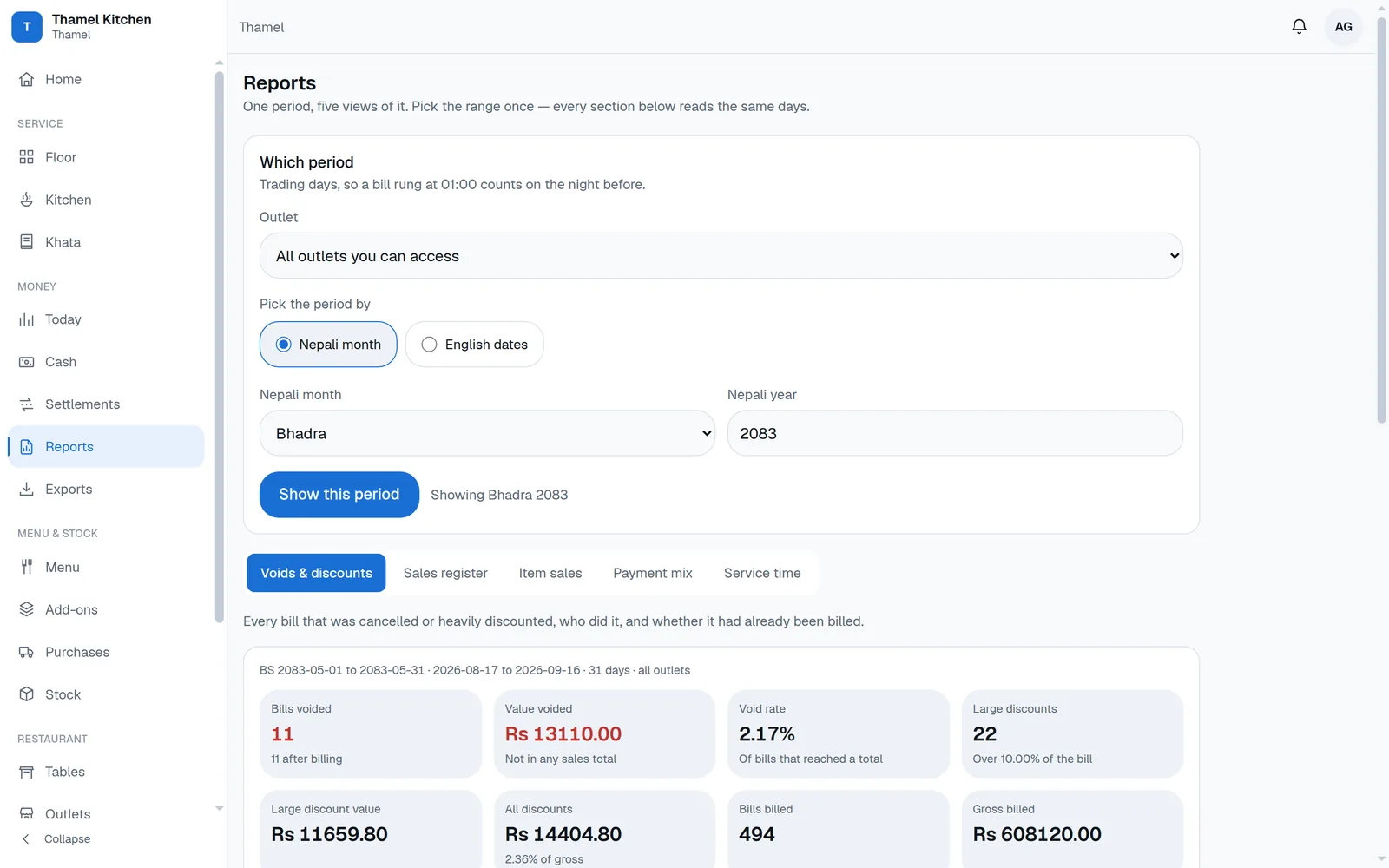
Reports in the Nepali calendar
Sales, item sales, payment mix, service time, voids and discounts — by Bikram Sambat month, because that is the month your accountant works in. Lock a closed fiscal month and the books refuse to change.
Five exports your accountant can open
Sales register, purchases, stock movements, expenses and stock on hand, as Excel spreadsheets, carrying both the Bikram Sambat and the English dates.
A different screen for each job
Waiters, reception, kitchen, managers, the accountant and the owner each see what their job needs. The kitchen display carries nothing about money; you see all of it, plus who changed what.
More than one outlet
Run several branches from one account. Each outlet has its own tables and bill numbers, and staff switch branch from their account menu.
Free for the first 6 months.
It runs on hardware you already own
Nothing to install on your staff's phones
Every screen is a web page, built for a phone held in one hand in a dim dining room, and dark by default so it is not a torch in a guest's face. No app store, no download, no device to buy — the same screens open on a tablet at the pass or a laptop in the office.
Your books are separated by the database, not by good intentions
One installation holds many restaurants, and the wall between them is enforced inside Postgres — row-level security on forty tables and forty-four composite keys — rather than by a line of code somebody has to remember to write in every new screen. A test suite signs in as one restaurant and attacks another's orders, menu and kitchen rail; it has to fail to get in before anything ships.
Copied off the machine every night, and checked before it is kept
A full copy of the database goes off the machine automatically at 4:30 every morning — after the trading night has closed, so a backup never splits one night in half. The script verifies the copy first and refuses to upload one that fails the check. A backup nobody has verified is not a backup.
What your staff actually see
Three screens from a working restaurant. Every number, dish and date below is real data from the software, not a drawing of it.
Free for your first 6 months
The first 6 months of use cost you nothing.
After that it is paid, and the price is simple. We have not put a number on this page because we would rather agree it with you directly, once you know what the software is worth to your restaurant.
We set up restaurants one at a time. Write to us and we will talk through how your floor runs before anything is switched on.
Start your 6 free months
Send this and we will get back to you to talk through how your floor runs before anything is switched on. The first 6 months are free. You can also call us on +977 9812255299.